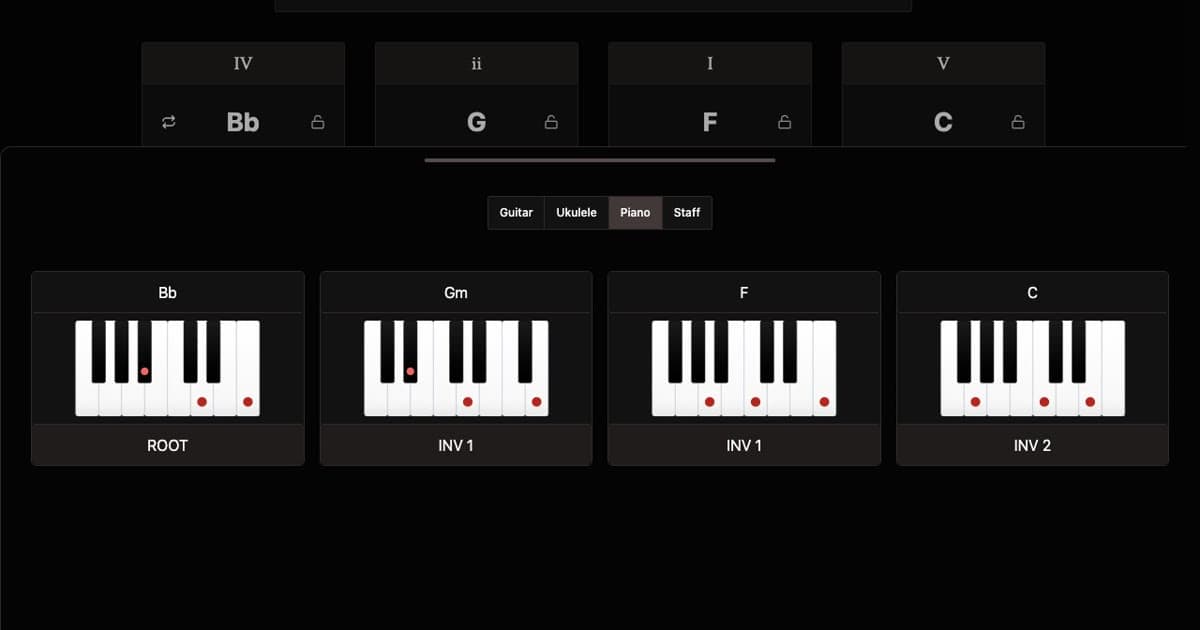
Build piano chord progressions with ease. Generate sequences in any key, experiment with different styles and voicings, and hear your progressions with built-in playback. See exactly which piano chords to play with interactive diagrams.
Each piano chord diagram highlights the keys to press. Click the bottom of a diagram to cycle through inversions — root position, first inversion, and second inversion — so you can find smooth transitions between chords without jumping across the keyboard.
Use the voice leading controls further down the page to hear how different inversions connect. Keeping your hands close together between chords is one of the simplest ways to make a progression sound polished. You can also switch to guitar chord charts or staff notation using the tabs above.
One thing that makes the piano unique is how directly the chord cards translate to what you play. The chord name on the card is exactly what your hands press — there are no alternate fingerings or capo positions to think about. What you see is what you play, which makes it easy to take a generated progression and sit down at the keyboard immediately.
The sequencer patterns double as comping rhythms. In a band context, pianists rarely hold chords for an entire bar — they comp, hitting chords on specific beats to lock in with the drummer. Toggle sequencer steps to sketch out a comping pattern, or spread hits across the grid to create an arpeggiation-style feel where notes cascade rather than land all at once.
Voice leading is arguably more important on piano than any other instrument. Smooth inversions — where one or two notes shift while the rest stay put — are the hallmark of polished piano playing. The voice leading controls let you hear this in action: set a chord to neutral and listen to how the generator keeps each voicing close to the last, the way a trained pianist would naturally connect chords without leaping across octaves.
For tempo, piano ballads breathe best around 60 to 80 BPM — slow enough to let sustained chords ring and melodies float above them. Pop piano sits comfortably between 100 and 120 BPM. If you're exploring jazz comping, try enabling swing: it shifts the off-beat hits just enough to give the rhythm a triplet lilt that straight timing can never quite capture.
Shuffle Chords
Generate new chord progressions with the shuffle button. Press this button lets you quickly cycle through chord, bpm and root configurations.
You can also use the lock controls to stop individual chords or settings from changing on shuffle.
The undo lets you revert changes and shuffles.
Chord Cards
Every chord card is divided into three interactive areas that define how a chord sounds and functions.
The top button displays the scale degree of the chord within the progression, denoted as a roman numeral. These numerals correspond the chords function within the scale. Press this button to cycle through different scale degrees.
The center of the card identifies the name of the chord. Clicking here will restart playback from this chord.
The bottom button displays and controls the quality of the chord. These can be used to shape the emotional color of the sound. Press this button to cycle through different chord qualities.
Root Selector
The root note is the tonal center of your progression and defines which notes and chords belong together.
Select any root around the circle, or use the arrows to transpose chromatically.
Detected Keys
The root note in combination with the chords determines the key of the progression. The detection algorithm analyzes your four chords and identifies the most likely key and mode. A given chord progression can belong to multiple keys and modes.
BPM Control
BPM (beats per minute) is the tempo of your progression. This determines how fast or slow it plays.
Drag the slider or click a preset to jump to a common tempo.
Sequencer
The sequencer grid controls when each sound plays within a bar. The top row triggers piano chord hits and the bottom row triggers the kick drum. Each column is one subdivision of the bar.
Click a step to toggle it on or off. The dropdown at the top left lets you swap between drum styles, and the lock icon preserves the current style when you shuffle.
Voice Leading
Voicings control where on the piano each chord is played. Neutral finds the closest voicing to the previous chord, keeping movement minimal. Up and down bias the direction, creating a sense of rising energy or descending resolution. Click a control to change the voicing for that chord.
Chord Duration
Controls how long each chord is held. 2 means each chord lasts two bars, 1 is one bar per chord, and 1/2 plays each chord for half a bar so they change quicker.
Swing
Adds a rhythmic shuffle to the beat. When swing is on, off-beat notes are delayed slightly, creating a triplet-like feel instead of a straight grid. This transforms rigid patterns into something looser and more musical.
Swing works best with styles that have off-beat hits. If no notes fall on a swing position when you toggle it on, a chord hit is automatically added so you can hear the effect immediately.